
To ensure our platform remains a trusted environment for your asset management, we have implemented a robust Data Retention Framework designed to align with global privacy standards. Our system automates the lifecycle of your data through three core pillars: automatic account deactivation for inactive users, permanent data anonymization—which strips all Personally Identifiable Information (PII) to meet the strict requirements of Quebec’s Law 25, Canada’s PIPEDA, the UK and EU GDPR, the US CCPA/CPRA, and Australia’s Privacy Act—and final user deletion for long-term records. This guide outlines how these features protect individual privacy while maintaining the historical integrity of your inventory data.
Requirements
- You must be an administrator with access to the Settings
Getting Started
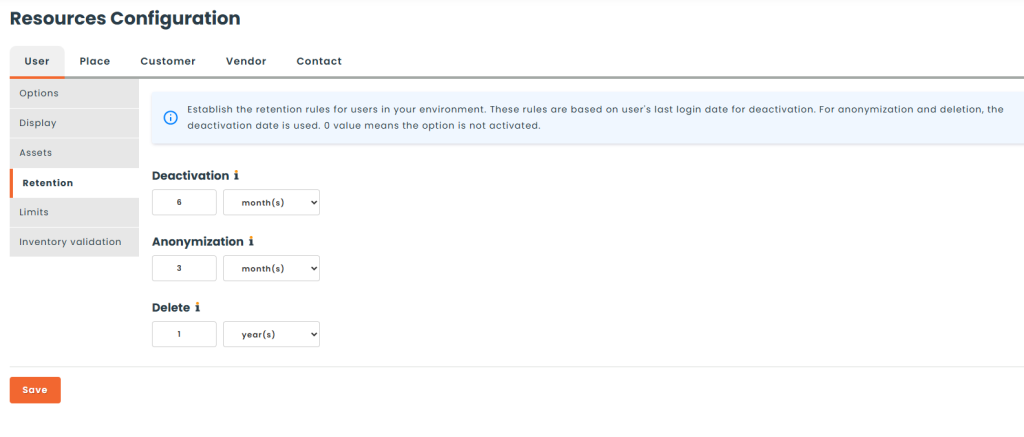
To configure data retention policies for your users, navigate to the Settings > Resources > Users > Retention page. You’ll be on the right page if you find yourself a page similar to this one.
Deactivation
You can setup a specific date range for when user accounts will be automatically deactivated in your environment. This information is based on the user’s last connected date, or if they never connected to the app, their created date. A deactivated user can no longer connect to the app. In the example above, user’s having not logged into their account will be automatically deactivated after 6 months.
If you’re synchronizing users automatically with Entra, Google, OneLogin or other provisioning methods, you’ll be deactivating your users in the source system, which will then deactivate them in Hector.
Leave 0 as a value if you’ll be manually deactivating accounts.
Anonymization
Similar to deactivation, you can automatically anonymize deactivated user accounts after a specified period. In the example above, a user’s personal information would be anonymized three months after being deactivated. You can leave 0 as a value to turn off anonymization.
When a user is anonymized, the following fields on the user are permanently replaced :
- First Name
- Last Name
- Account
- Note -> value is cleared
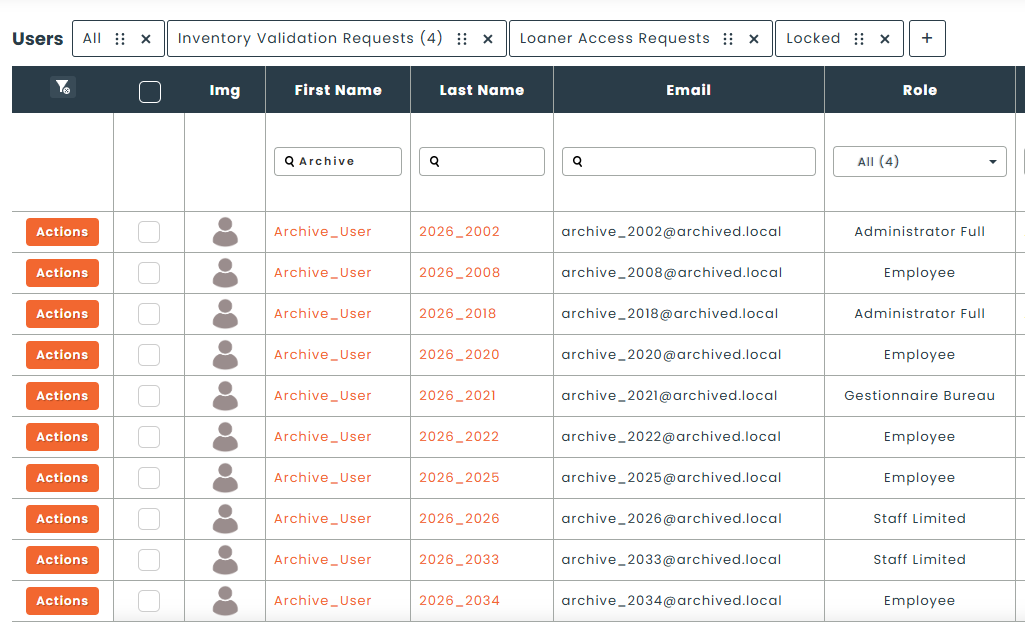
All historical information is also anonymized, making it impossible to determine which user actually made the changes or transactions in the system.
An anonymized user’s PII cannot be recovered, so please be careful when implementing this feature to prevent losing important information in your environment.
The following is an example of anonymized user data in the app.
Deletion
The last option is permanent deletion of the user record in your environment. The selected time period is based on the user’s deactivation date. Deleted users will no longer appear in the app, and all traces will be permanently wiped from the environment. You can leave 0 as a value to turn off deletion.
It’s also worth noting that transactions performed by the user will become orphaned, but they will still maintain non PII information like assets, dates, locations for historical purposes.
Deleted users cannot be recovered, so please proceed carefully when setting up data retention policies.
Maintaining a balance between historical asset tracking and modern privacy compliance is essential for any forward-thinking organization. By leveraging these automated deactivation, anonymization, and deletion protocols, you can confidently navigate the complexities of global data regulations while keeping your inventory records clean and secure.
If you have specific questions about configuring these retention policies to fit your internal governance or need assistance with regional compliance settings, our team is here to help. For more information or a personalized walkthrough of these features, please reach out to us at [email protected].