
Every reservation in Hector carries a status that tells you where it sits in the loan lifecycle — from the moment it is requested to the moment the items come back on the shelf.
The list of statuses is fixed: you cannot add or delete one. What you can do is change how each one is presented — its name, the wording of the button that triggers it, and its colour. See Renaming statuses below.
The statuses
Statuses are listed below in their natural progression order.
Pending Approval
The reservation has just been created and is waiting for a store staff member to approve or refuse it. This status only appears when the stockroom requires approval.
New
A registered reservation on which no preparation work has been done yet. A reservation that gets approved also lands here.
Refused
A staff member rejected the request. The reservation is closed and the items are released.
Prepared
A staff member has taken charge of the reservation and the items are ready to be handed over. Marking a reservation as prepared also assigns it to the staff member who did it, so Prepared answers both is it ready? and who handled it?.
This status was previously labelled Assigned. The default action button is Mark as prepared.
Partially Out
Some — but not all — of the reserved items have been handed over to the user. Hector sets this automatically; there is no button for it, because it is the result of lending part of a reservation.
Out
Every reserved item has been handed over to the user. The default action button is Lend.
Overdue
A checked-out reservation whose end date has passed without being returned. Hector flags it automatically on its next background pass, so expect it to appear shortly after the end date rather than at the exact minute. Depending on your penalty settings, going overdue can also cost the user penalty points and block their other reservations.
To be inspected
The items have come back but still need to be checked before they return to the available pool. Whether this step is used depends on your stockroom configuration.
Completed
Every item has been returned (and inspected, if inspection is enabled). The reservation is closed.
Cancelled
The reservation was called off before or during the loan, and the items were released.
Suspended
This one is not an end state. A reservation is suspended automatically when the requester is blocked — typically because they have an overdue loan and the stockroom has Block user on overdue turned on, or because the penalty system has run them out of points. The reserved items stay reserved. When the block is lifted, Hector restores the status the reservation had before it was suspended.
Damaged is a view, not a status
The loaner list has a Damaged entry alongside the statuses, and it has its own colour in the settings — but it is not a status a reservation is ever set to. It is a derived filter: it shows reservations that contain at least one asset whose Condition is Broken.
Because of that, its name is fixed and cannot be renamed — only its colour can be changed.
Renaming statuses
Status wording is customisable, so you can align Hector with the vocabulary your team already uses: Prepared can become Picked, Out can become Checked out, and so on.
Go to Settings → Loaners Configuration → Statuses. Each row gives you three fields:
| Field | What it does |
|---|---|
| Status Name | The label shown on the reservation, in lists, on the calendar and in emails. |
| Action Name | The label on the button that moves a reservation into that status. It is only visible when hovering the action button. |
| Status Color | The colour used for that status in lists, on the calendar and on the timeline. |
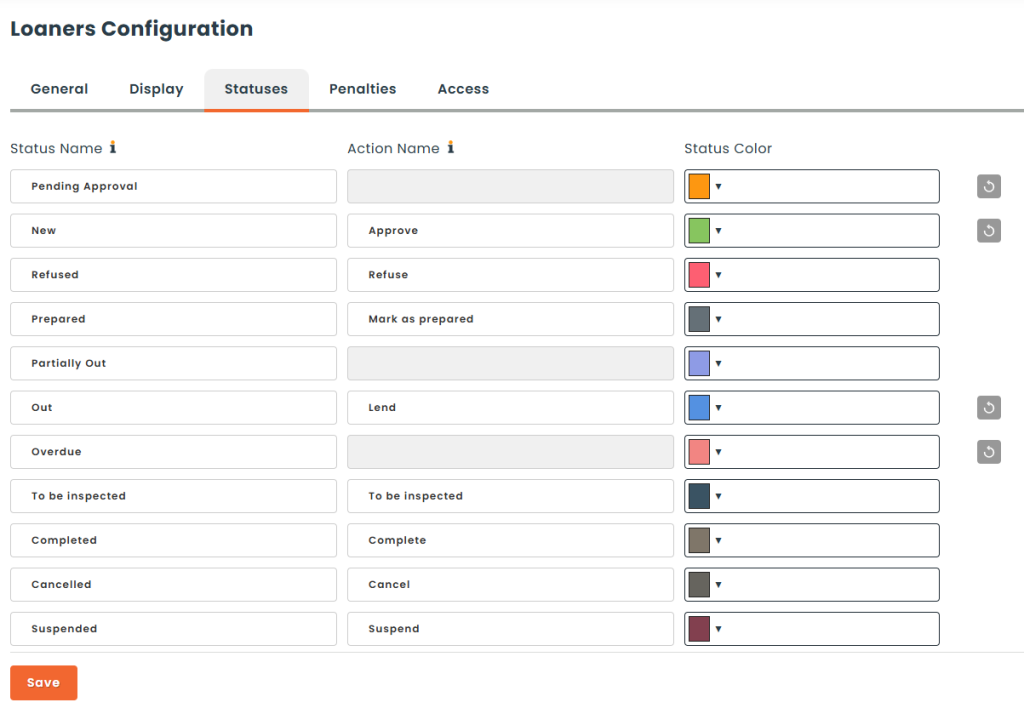
A few things to know:
- Renaming is cosmetic. It changes the label only — no workflow, rule, automation or report behaviour changes.
- Names must be unique. Two statuses cannot share the same name, and two actions cannot share the same action name. Saving a duplicate is rejected.
- Renames are per language. The name you type is saved for the language you are currently using. Switch your interface to French or German and set the label again to customise it there. Untouched languages keep the Hector default.
- Some fields are locked. Pending Approval, Partially Out and Overdue have no action name, because Hector applies them automatically — there is no button to relabel. Damaged has neither a name nor an action, only a colour.
- Restoring a default. Clear a field (or use the restore control next to it) to fall back to Hector’s built-in label.
Quick reference
| Status | Set by | Ends the loan? |
|---|---|---|
| Pending Approval | Request submitted, approval required | No |
| New | Request registered or approved | No |
| Refused | Staff | Yes |
| Prepared | Staff (Mark as prepared) | No |
| Partially Out | Automatic — some items lent | No |
| Out | Staff (Lend) | No |
| Overdue | Automatic — end date passed | No |
| To be inspected | Staff (return) | No |
| Completed | Staff or automatic close | Yes |
| Cancelled | Staff or user | Yes |
| Suspended | Automatic — user blocked or penalised | No (temporary) |
| Damaged | Derived — a linked asset is Broken | View only |