
Hector tracks an asset from the moment someone asks for it to the moment it leaves service for good. This article walks the whole path: how demand becomes a purchase, how reception turns a purchase into tracked assets, how those assets reach the people and places that need them, how usage, maintenance and value accumulate along the way, and what happens at end of life. Every state name used below is the one you see in the application, in exports, and through the API.
The whole loop at a glance
Hector models inventory as a sequence of documents that hand off to one another, with the asset record itself as the thing that persists. A requisition captures a need. A purchase order captures a commitment to a vendor. Reception is the moment assets are born. A transfer order carries them to their destination. From there the asset lives in states, accumulates usage and cost, and is eventually archived under a reason you define.
The spine in the diagram below is the standard path. The branches on the right are the shortcuts and side channels that real operations depend on, because not every item passes through every document.
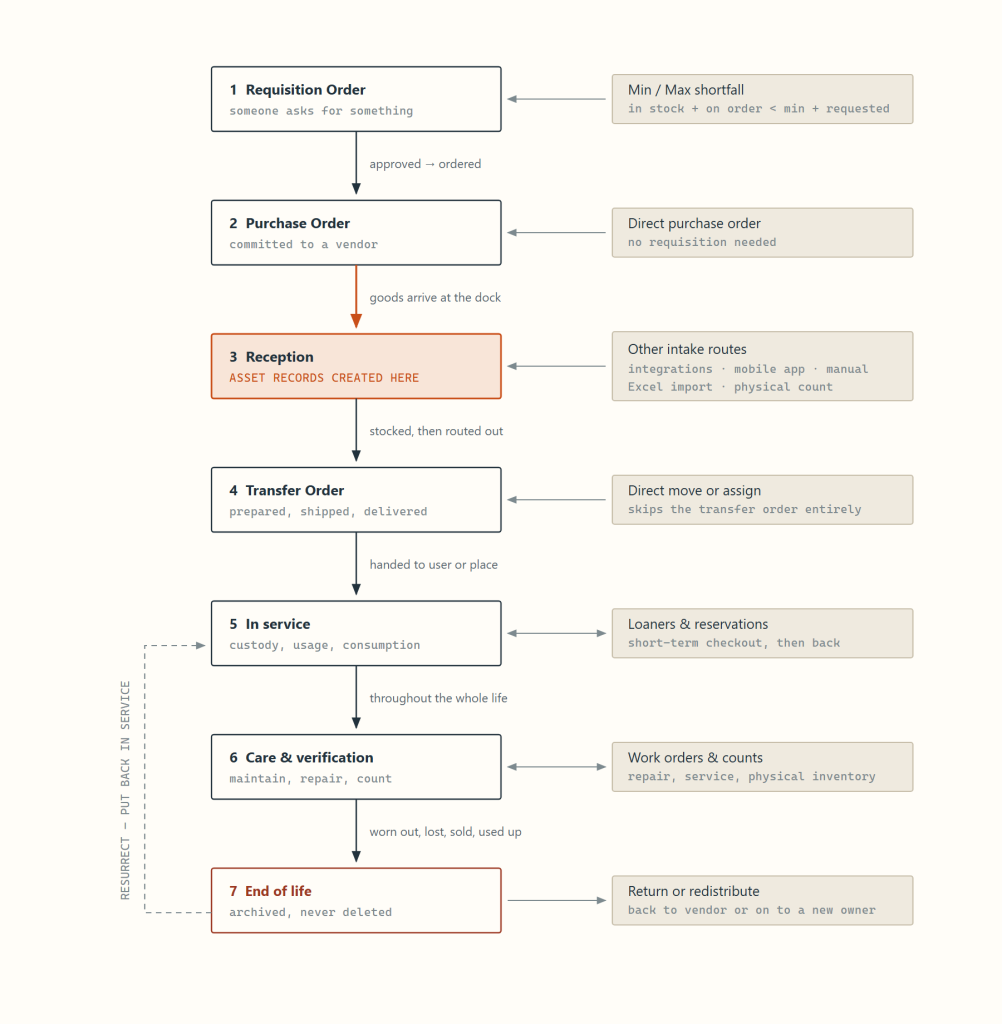
Three kinds of object do the work. Documents (requisition, purchase, transfer, work and return orders) each carry their own numbered state ladder, an optional approval step, an owner, and an audit trail. The asset record is created at reception and never destroyed; it carries a state, a location, a condition, a value, custom attributes, and a full history of every move. The catalog of categories and parts defines what an asset is before any exist.
Foundation: what you set up before anything moves
Nothing in the lifecycle behaves correctly if the catalog is wrong, because the catalog is what decides how reception creates records. Two objects do most of the work.
Category
The class of thing. A category decides the single most consequential rule in the whole system: whether items are lot-size or unit-tracked.
- Unit-tracked — every physical unit becomes its own asset record with its own asset tag. Laptops, vehicles, instruments, furniture.
- Lot-size — one record carries a quantity. Cables, gloves, toner, screws. Quantity is drawn down as it gets used and reaches zero rather than being individually retired.
The category also owns the asset tag prefix and suffix used to auto-generate tags at reception, its own set of custom attributes, and permission cohorts. When you create a new unit-tracked category, Hector automatically binds the Serial Number attribute to it, which is what later switches on the serial capture step during reception.
Part
The specific catalog item — a make and model, not a physical unit. The part is where purchasing and service defaults live: vendor, unit price and currency, default racking, minimum and maximum stock levels, preventive maintenance frequency, and whether it is a kit master whose components should be created automatically.
Places to put things
Hector separates storage from deployment. Stockrooms, subdivided into racking, are where inventory rests and is counted. Places, subdivided into spaces, are where assets are deployed — a building, a floor, a room, a classroom, a vehicle. Users, departments, vendors, contacts and customers are the other custody holders an asset can sit with.
Minimum and maximum stock levels
Per part, per category and per stockroom you set a minimum and maximum quantity. Hector continuously compares quantity in stock plus quantity on order against the minimum plus what has already been requested. When the first is lower, the item appears on the replenishment list and on the dashboard, and lines can be pushed straight from that list into a purchase order. This is the loop that keeps consumables from running out without anyone watching.
Set this up once, deliberately. Whether a category is lot-size cannot be casually changed later, because it determines whether history is kept per unit or per quantity. Decide unit-tracked versus bulk on one question: will anyone ever need to know which one?
Stage 1. Demand: the requisition order
A requisition is a request, not a commitment. Someone — a teacher, a technician, a site manager — asks for equipment on behalf of a destination: a user, a place, a stockroom, a customer. It carries a requester, an owner, an expected date, a priority, and lines of parts with quantities. Lines can pre-set asset attributes, so values captured at request time survive all the way onto the asset record created weeks later.
The state ladder runs Draft, Pending approval, New, In progress, Delivered, Completed, Closed, with Refused and Cancelled as side exits. Approval is optional per configuration. Once approved, the requisition moves to New and lands in a fulfilment planning screen, which is where demand meets reality.
The fulfilment decision, line by line
For every line, Hector shows how many units are in stock, how many are already committed to other requisitions, and how many are therefore back-ordered. You then pick one of three progressions per line, and they can be mixed within a single requisition.
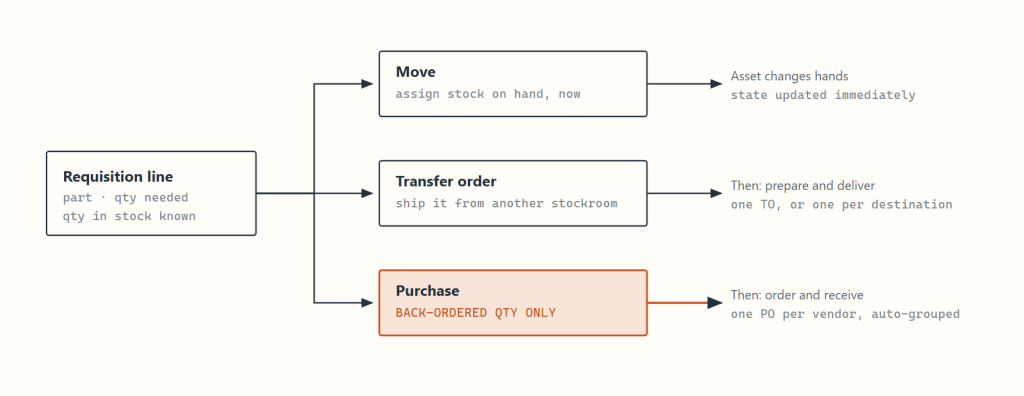
- Move — assign stock on hand right now. The asset changes hands and its state updates immediately.
- Transfer order — ship it from another stockroom, either as one order or one order per destination.
- Purchase — the back-ordered quantity only. When several lines need buying, Hector groups them by the vendor on each part and creates one purchase order per vendor.
Two operational details are worth knowing. Purchase orders generated this way keep a link back to the requisition, so when the goods are received the requisition owner can be notified automatically that the request is now fulfillable. And a large requisition, with more than fifty lines being progressed at once, is handed to a background job rather than processed in the browser, so the person who clicked Save is not left waiting.
Stage 2. Acquisition: the purchase order
The purchase order is the commercial document. It can be born from a requisition, from the replenishment list, or created from scratch. Its header carries the vendor and vendor contact, the owner, order date, expected reception date, an expiration date, currency and exchange rate, an order-level discount, up to three tax lines, a reference number, the delivery stockroom, and the delivery address.
The ladder runs Draft, Pending approval, New, Sent, Partially received, Received, Paid, Completed, with Cancelled as a side exit. Every line carries its own status on the same ladder, and the header status is derived from the lines rather than set by hand: any line partially received drags the whole order to Partially received, and only when every line is fully received does the header reach Received, stamping the fully-received date.
What a line holds
- The part, a free-text description, quantity, lot size, unit price, line discount and computed amount.
- Received quantity and received date, updated on each reception event, because a line can be received in several passes.
- Pre-set asset attributes. You can fill in the values you already know at order time — colour, configuration, cost centre — and they are stamped onto every asset the line creates.
- Software instead of a part, for licence and subscription purchases that need the same approval and payment trail.
- Optionally no part at all. A line can be ordered against a description only, and the receiver either links an existing part or creates one on the spot before receiving it.
Ownership can change automatically as the order advances, so the person responsible for approving is not necessarily the person responsible for receiving. State changes can trigger notification emails to the owner, filtered to only the transitions you care about.
Stage 3. Reception: where assets are born
This is the pivot of the entire lifecycle. Before reception you have a commercial document; after it you have tracked physical things. Reception is done per line, and for each line the receiver supplies three facts: how many arrived, where they are going (stockroom, and optionally a specific racking location), and the date they arrived.
What happens next depends on the category behind the part, and this is the single most important mechanism to understand.
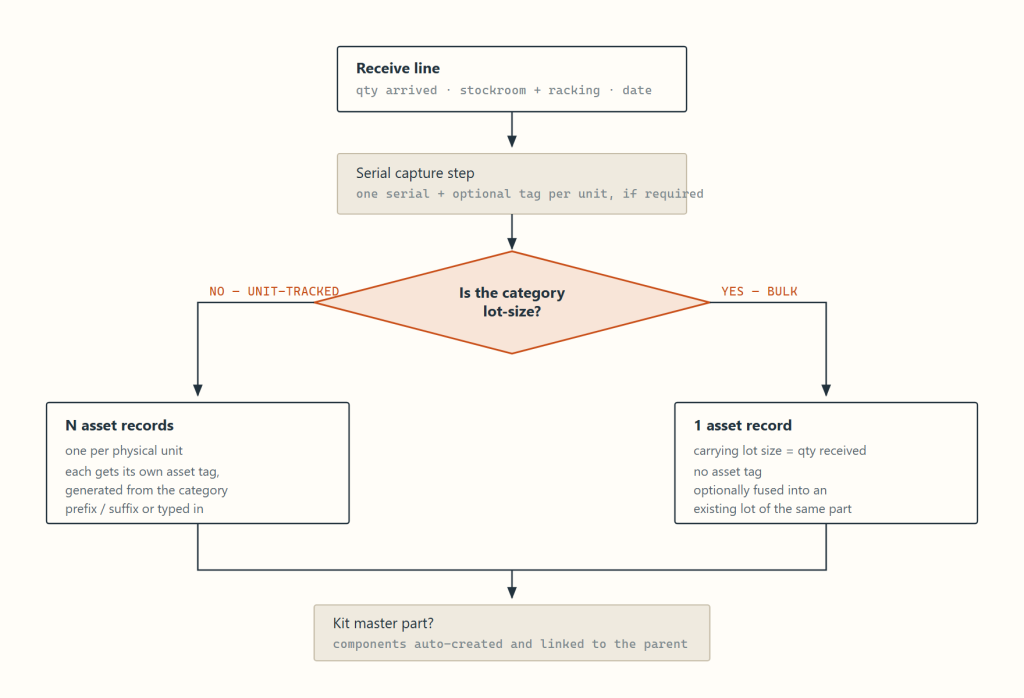
For a unit-tracked category, Hector loops through the received quantity and creates one asset per unit, each with its own asset tag generated from the category prefix and suffix or typed in during the serial step. For a lot-size category it creates a single record carrying the received quantity as its lot size, with no asset tag, optionally fused into an existing lot of the same part. If the part is a kit master, its components are created automatically and linked to the parent.
What every new asset inherits
| Field | Source |
|---|---|
| Title | Composed from the part using your configured asset title fields, such as maker, model and description |
| Asset tag | Generated from the category prefix and suffix, or the tag typed in during the serial step |
| State | In stockroom, with the receiving stockroom and racking recorded |
| Condition | Good |
| Acquired date | The reception date entered by the receiver, not today’s date |
| Price and currency | The purchase order line price and the order’s currency |
| Next maintenance | Reception date plus the part’s maintenance frequency, if one is set |
| Attributes | Line-level pre-set values, plus the captured serial number |
| Origin | The purchase order it came from, so the asset always points back at what bought it |
Partial and over-receipt
Reception is incremental. Receive four of ten and the line sits at Partially received with a received quantity of four; receive the remaining six later and it closes. Over-receipt is permitted — if eleven arrive against ten ordered, the line goes to Received and the line amount is recalculated against the real quantity, so the order total matches the invoice you will actually pay.
The other ways assets appear
A purchase order is not required to have an asset in Hector. Reception is the primary route, and the richest one, because it stamps price, vendor and acquisition date automatically. But plenty of equipment was never bought through Hector: it predates the system, arrived as a donation, was bought on a credit card, or was discovered in a cupboard. All of it can be tracked, through four other routes.
- Integrations — the highest-volume route for IT fleets. Device management and directory systems such as Intune, Jamf, Google and Entra discover hardware and import it as asset records automatically, matching on serial number so an existing record is updated rather than duplicated. Assets created this way keep syncing: hostname, model, disk, last connected user and last seen date are refreshed on each run, so the inventory maintains itself without anyone typing.
- Manual creation, including from the mobile app — a single asset can be created by hand from the web interface, or in the field from a phone or tablet. This is the practical route for capturing equipment that was never on a purchase order: walk the room, scan or type the serial, pick the category and location, and the asset exists. Because the mobile app applies the same category and attribute rules, an asset created on a loading dock is as complete as one created at a desk.
- Spreadsheet import — the standard route for initial onboarding, when you already have an inventory in Excel and need a few thousand records in at once.
- Physical count — the safety net. When a count finds something on the shelf with no record behind it, that surplus can be turned into a new asset on the spot, during the count, without leaving the document. Over time this is what closes the gap between what you own and what you have written down.
Practical consequence. Two of these routes, integrations and physical count, create assets without anyone deciding to. Assets that appear this way have no purchase order behind them, so price, vendor and acquisition date start empty and are worth filling in if you intend to depreciate them or report on total cost of ownership.
Stage 4. Delivery: the transfer order
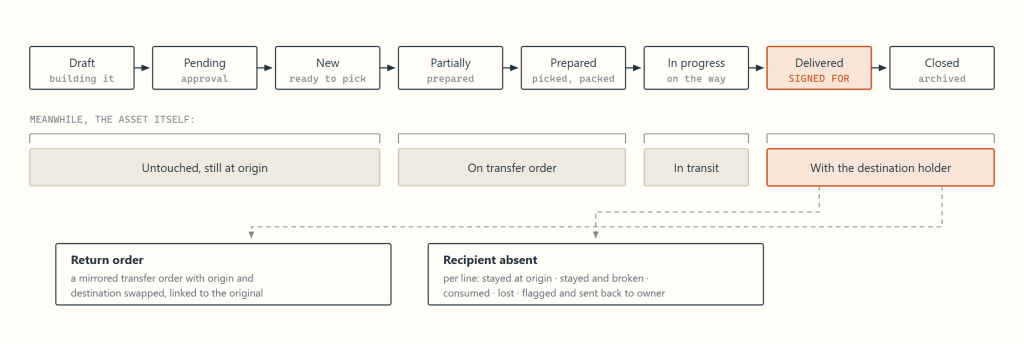
A transfer order moves assets from an origin to a destination with a paper trail: who prepared it, who carried it, what condition it arrived in, and who signed for it. Use it when the move needs to be planned, picked, shipped and confirmed. Skip it, using a direct move or assign, when someone is simply handing a laptop across a desk.
Preparation and picking
Preparing a line is the act of committing specific assets to it. For unit-tracked items you pick the actual units. For lot-size items you specify a quantity and Hector splits the lot: the shipped quantity becomes its own record that travels, while the remainder stays behind. Unit price is apportioned across the split so value stays correct on both sides.
Delivery
On delivery each line is confirmed with a condition — Good, Poor or Broken — and a received quantity. Lines can be set to consume on delivery, which is how consumables handed to a technician are written off at the moment they change hands rather than lingering as stock. Once confirmed, the asset moves to the destination and its state becomes whatever that destination implies: with a user, with a place, with a user at a place, with a contact, customer or vendor, or back into a stockroom.
If the recipient is absent, each line can be resolved individually: stayed at origin, stayed and broken, consumed, lost, or flagged and sent back to the owner. A transfer order can also spawn a return order, which is a mirrored transfer order with origin and destination swapped and a link back to the original.
Guards
Hector refuses to progress a transfer order that would break something else: an asset already reserved as a loaner for an overlapping period, an asset locked because a physical count is in progress on its stockroom, or a line demanding more quantity than actually exists. These are surfaced as specific errors naming the assets involved, rather than a generic failure.
Stage 5. In service: custody, usage and consumption
Once delivered, an asset’s life is described by its state — where it is and who has it — plus everything that accumulates against it. Most assets spend years cycling between a handful of these states.
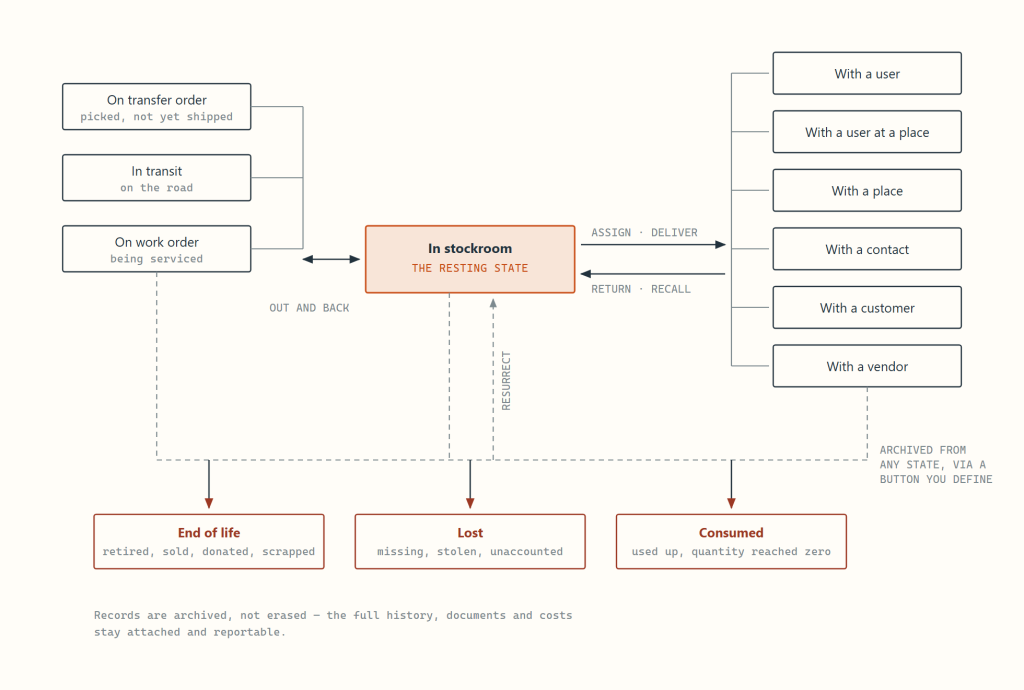
Long term versus short term
Custody comes in two flavours. A long-term assignment is an issue: this laptop is now this person’s laptop. A short-term one is a loan, with a due date. Loans run on their own ladder — Pending approval, New, Assigned, Partially out, Out, Overdue, To be inspected, Completed — and are the mechanism behind equipment libraries, tool cribs, AV carts and classroom sets.
Loans support reservations against a calendar, recurring bookings, self-service catalogs, approval chains, electronic signature on pickup and return, automated reminders, and penalties for late, lost or damaged returns, which can be turned into an invoice. The To be inspected step exists so that returned equipment is checked before it goes back on the shelf as available.
Usage metering
Hector does not just record where an asset is, it records how hard it works. Occupancy periods such as loan periods and place assignments are expanded into one usage day per asset per calendar day, then rolled up into lifetime usage figures on the asset and aggregated upward to the part, the category and the stockroom. That is what lets you answer the questions that justify or kill a purchase: which models are never used, which stockroom is over-supplied, which category is at capacity.
Consumption, kits and history
Lot-size assets are drawn down rather than moved. Quantity can be consumed explicitly, consumed automatically on assignment, or consumed as the difference on a partial delivery. When the quantity reaches zero the record moves to Consumed: it stops appearing as stock, but its history and cost remain in reporting.
Assets can also be assembled. A parent asset with child components can be created automatically at reception from a kit definition or built by hand later, and Hector tracks incomplete kits as their own worklist, so a cart missing its charger is visible. Separately, assets can be associated with one another, a looser link for things that belong together without one containing the other.
Every event along the way — insert, update, move, assign, maintenance, adjustment, transfer, receipt, consumption, loss, end of life, resurrect — writes a typed entry to the asset’s history alongside a snapshot of what changed, including attribute-level history. Combined with last seen and last validated stamps, that history is what you show an auditor.
Stage 6. Care: maintenance and work orders
Two distinct things share this stage: planned upkeep and unplanned repair.
Preventive maintenance
The part carries a maintenance frequency. Every asset created from it gets a next maintenance date at reception, and that date rolls forward each time maintenance is performed. Assets that are due appear on a dedicated maintenance list and drive notifications. Each maintenance event records the date, who did it (an internal user, a vendor, a contact, or free text), the type and task, the cost, supporting documents, and the resulting condition of the asset.
Work orders
When something needs real work — a repair, an installation, a scheduled service visit — a work order carries it and financially closes the loop through invoicing and payment. The ladder runs Template, Draft, Pending approval, New, Assigned, In progress, Finished, Invoiced, Paid, Closed.
While the work is happening the asset reads as On work order, so nobody tries to assign or ship it. Lines can be hours, parts consumed, descriptions or penalties; the order carries currency, exchange rate, discount and taxes, and rolls into an invoice which itself runs Draft, Pending approval, New, Sent, Partially paid, Paid. Templates let you turn recurring service work into a one-click order.
Condition — Good, Poor, Broken — is recorded on delivery, on loan return, after maintenance, and during counts. Broken assets surface on their own list, which is usually where the end-of-life decision starts.
Stage 7. Verification: the physical count
Records drift from reality. The physical count is the reconciliation mechanism, and it is deliberately a controlled document rather than an ad-hoc edit, because adjusting inventory is exactly the kind of change that needs a reviewer. The ladder runs Draft, Pending approval, Approved, In progress, Adjustment, Completed, Closed, with Refused and Cancelled as side exits.
You scope a count to stockrooms, racking, places or categories, and can put it on a recurring schedule. Counting is done by scanning, with barcode or RFID, or by working down a printed list. While a count is in progress the assets in scope are locked: transfer orders and moves involving them are refused, so the count cannot be invalidated underneath the person doing it.
What a counted line can say
Each line resolves to an outcome richer than found or not found, because the interesting cases are the ambiguous ones: found, partially found or found in surplus; found somewhere other than where the record says; out on loan and therefore legitimately absent; present here but belonging to another stockroom; missing; unknown; or entirely new, meaning something on the shelf with no record at all.
The adjustment step
Nothing changes until the count reaches Adjustment, where each discrepancy is resolved with an explicit decision.
| Discrepancy | Available actions |
|---|---|
| Missing | Archive it, move it to where it was actually found, give it to whoever has it, or do nothing this round |
| Surplus quantity | Add the quantity here, move the extra quantity in, take it from another location’s record, or do nothing |
| Out of stockroom | Move it into this stockroom |
| No record at all | Create the asset |
Adjustment decisions available at the end of a count.
Every adjustment writes its own entry in the asset’s history, tagged as originating from a count, so an unexplained quantity change is always traceable to the count that made it and the person who approved it.
Value: what the asset is worth along the way
Financial tracking runs in parallel with the physical lifecycle, seeded by the purchase order price at reception.
- Pricing — unit price and currency captured from the purchase, an exchange rate for multi-currency operations, a residual amount, and the ability to set a value baseline mid-life after a revaluation.
- Depreciation — straight-line or double-declining-balance, with a first-year convention of full year, half year, zero, full month, half month or single day, and a start point of either the accounting date or the acquisition date.
- Life span and warranty — an expected end-of-life date and a warranty end date per asset. Both drive their own worklists and advance notifications, so replacement budgeting and warranty claims happen before the date, not after.
- Accumulated cost — maintenance costs, work order amounts and loan penalties all attach to the asset, so total cost of ownership is a report rather than a spreadsheet exercise.
When a lot-size asset is split, for a partial shipment say, unit value is apportioned across the split rather than duplicated, so the sum of the parts still equals the value of the original lot.
End of life and decommissioning
Hector distinguishes the reason an asset left service from the effect that reason has on your numbers. There are only three effects, but you define as many reasons as your organisation actually uses.
| Behaviour | Means | Typical reasons you would define |
|---|---|---|
| End of life | Deliberately taken out of service. The unit existed and is accounted for. | Retired, Sold, Donated, Recycled, Traded in, Returned to vendor, Scrapped |
| Lost | Unaccounted for. Kept separate from end of life because shrinkage is a different metric from planned retirement. | Lost, Stolen, Missing after count, Never returned |
| Consumed | Used up. Reserved for lot-size items whose quantity reached zero. | Consumed, Issued to production, Written off |
The three terminal behaviours, and the reasons that map onto them.
Archive statuses are yours to define
Each reason becomes a configurable archive status with its own name, button label, colour, icon and sort order. Per status you control whether a note is optional or mandatory, whether supporting documents are optional or mandatory, which roles can see it, and whether it appears as a prominent button or is tucked into a dropdown. So Sold can demand a note and a copy of the receipt, while Recycled needs neither, and both still roll up as end of life in your reporting.
Nothing is erased. Archiving removes an asset from active inventory but keeps the record, its full move history, attribute history, documents, maintenance and costs. There is a separate soft delete for records created in error, and even that is a tombstone rather than a purge. Retention and audit survive decommissioning.
Bulk retirement and reversal
End of life rarely happens one unit at a time. A batch applier lets you select a set of assets — a filtered list, a whole racking location, everything past its life span date — and apply one archive status with a shared note and documents in a single operation.
Assets also come back. A missing laptop turns up; a machine written off gets repaired instead. Resurrect returns an archived asset to service, either to where it was or to a new location, writes the reversal into its history, and re-validates any loan reservations that were cancelled when it was archived. This is the only path that runs backwards out of a terminal state, and it is deliberately explicit rather than a quiet edit.
Disposal channels
- Return to vendor — a return order, which is a mirrored transfer order pointing back at the supplier, linked to the original delivery.
- Internal redistribution — rather than retire, move the asset to a stockroom serving a lower-priority need. Usage figures are what tell you whether that is worth doing.
- Consume to zero — the natural end for lot-size items, requiring no decision at all.
State reference
The numeric codes below are the ones that appear in exports and API payloads. Negative values are consistently exceptional or terminal, which makes “is this record still live?” a simple test.
| Asset state | Code | Meaning |
|---|---|---|
| In stockroom | 10 | At rest in a stockroom, optionally in a specific racking location |
| With user | 20 | Issued to a person |
| With place | 30 | Deployed to a building, room or space |
| In transit | 40 | Physically moving between two holders |
| With user at place | 50 | Issued to a person, at a specific location |
| With contact | 60 | Held by an external contact |
| With customer | 70 | Held by a customer |
| With vendor | 80 | Held by a supplier, typically out for repair or returned |
| On work order | 90 | Committed to service work |
| On transfer order | 100 | Picked for a transfer, not yet shipped |
| End of life | -100 | Retired under one of your archive statuses |
| Lost | -200 | Unaccounted for |
| Consumed | -300 | Quantity used up |
| Deleted | -999 | Soft-deleted tombstone for records created in error |
Asset states and their numeric codes.
| State | Requisition | Purchase | Transfer | Work order | Count |
|---|---|---|---|---|---|
| Template | — | — | — | 0 | — |
| Draft | 1 | 1 | 1 | 1 | 1 |
| Pending approval | 2 | 2 | 2 | 2 | 7 |
| Approved | — | — | — | — | 2 |
| New | 3 | 3 | 3 | 3 | — |
| Sent | — | 4 | — | — | — |
| Assigned | — | — | — | 4 | — |
| Partially prepared | — | — | 7 | — | — |
| Prepared | — | — | 8 | — | — |
| Partially received | — | 5 | — | — | — |
| Received | — | 6 | — | — | — |
| In progress | 4 | — | 4 | 5 | 3 |
| Adjustment | — | — | — | — | 6 |
| Delivered | 5 | — | 5 | — | — |
| Finished | — | — | — | 6 | — |
| Invoiced | — | — | — | 7 | — |
| Paid | — | 7 | — | 8 | — |
| Completed | 6 | 8 | — | — | 4 |
| Closed | 7 | — | 6 | 9 | 5 |
| Cancelled | -1 | -1 | -1 | -1 | -1 |
| Refused | -2 | — | — | — | -2 |
Document state ladders side by side. A dash means the state does not exist for that document.
| Loan state | Code | Meaning |
|---|---|---|
| Pending approval | 10 | Requested, awaiting an approver |
| New | 20 | Approved reservation, not yet picked |
| Suspended | 25 | On hold |
| Assigned | 30 | Specific units committed to the loan |
| Partially out | 35 | Some items collected |
| Out | 40 | Everything collected, in the borrower’s hands |
| Overdue | 50 | Past its return date |
| To be inspected | 60 | Returned, awaiting a condition check before going back on the shelf |
| Completed | 0 | Returned and cleared |
| Cancelled | -10 | Withdrawn before pickup |
| Refused | -30 | Declined by an approver |
How to read this article. Stages 1 through 4 are the procurement and delivery chain. Stages 5 through 7 are the operating life, which runs for years and loops. End of life is the exit. Not every organization uses every document: many run purchase orders without requisitions, or direct moves without transfer orders. The asset record and its history are the constant.