
Synchronize Devices on Demand from the Assets Page
Managing IT assets across multiple platforms can be challenging. With Hector’s on-demand device synchronization, you can pull the latest device information from your external management systems directly into your asset inventory — without waiting for a scheduled sync.
Supported Integrations
The Sync feature works with the following device management platforms:
- Microsoft Endpoint Configuration Manager (MECM)
- Microsoft Intune
- Google Chromebook
- Jamf Pro
- Jamf School
- C2 ITSM
- ServiceNow
Note: Only integrations that have been activated in your environment will appear on the Sync page.
How to Synchronize a Device
- Navigate to Inventory > Assets to open the asset list.
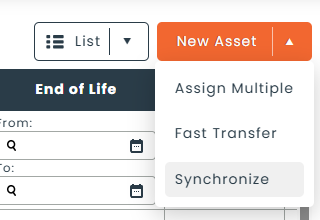
- Click the menu button next to “New Asset” in the top-right corner.
- Select Synchronize.
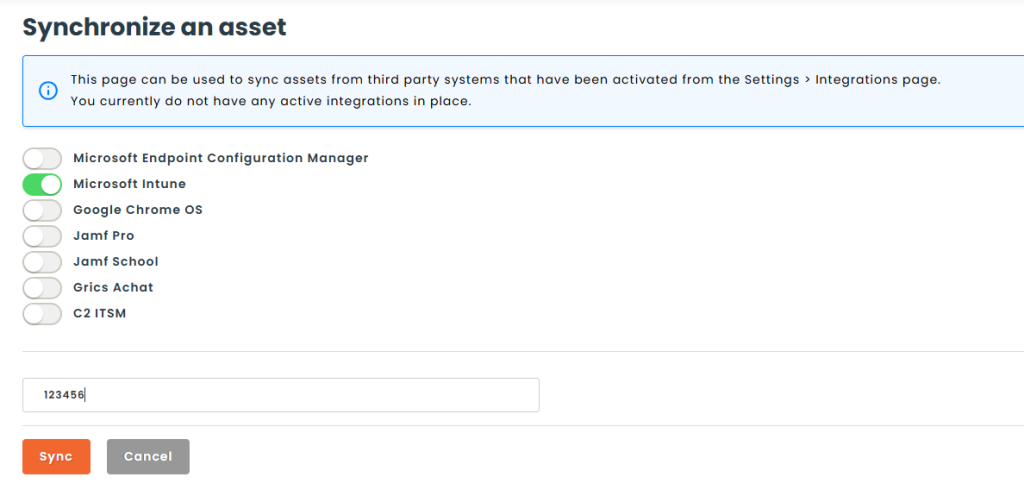
- On the Sync page, toggle on the integration(s) you want to search. If only one integration is configured, it will be selected automatically.
- Enter one or more device identifiers in the search field (e.g., serial number, device name).
- Click Sync.
Understanding the Results
- Device found — The asset is created or updated in Hector and a direct link to the asset record is displayed. You can click the link to view or edit the synced asset immediately.
- Device not found — A message indicates that no matching device was found in the selected integration. Double-check your search term and ensure the device exists in the external system.

Tips
- You can sync devices from multiple integrations in a single session — results accumulate on the page as you go.
- C2 ITSM is exclusive: when selected, all other integrations are disabled. Toggle it off to sync from other sources.
- This feature is ideal for onboarding new devices that were recently added to your management platform, or for refreshing asset details that may have changed (e.g., OS version,
assigned user).
When to Use On-Demand Sync vs. Scheduled Sync
Scheduled integrations automatically synchronize your full device inventory at regular intervals. On-demand sync is designed for situations where you need to:
- Immediately pull in a newly enrolled device without waiting for the next scheduled run.
- Verify or refresh the data for a specific asset.
- Troubleshoot discrepancies between Hector and your device management platform.