
A breath of fresh air blows with Hector’s fall update 🍂
This season, the entire team has mobilized to offer you an even more intuitive and efficient experience. Discover our new rental rate module today, navigate more easily thanks to 100% customizable tabs, and enjoy optimized management with the complete redesign of work orders.
Legend

Feature available with Shield, Armor and Castle plans

Feature available with Armor and Castle plans

Feature available with the Castle plan
🧡 Favorite new features
Gaia, your new AI ally
The era of intelligent management begins today on Hector with Gaia! For her debut, here is what your brand new AI assistant offers you :
Automatic image generation
Create high-fidelity visual representations for your equipment. By analyzing the brand, model, and part description, Gaia generates a realistic image for your catalog, ensuring optimal visual organization of your stock.
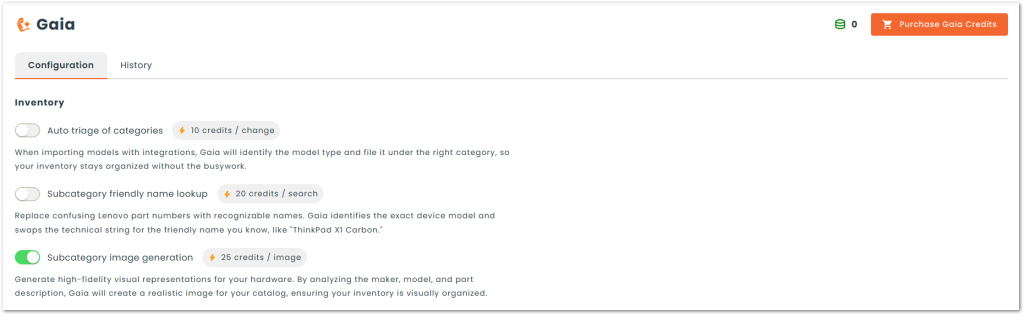
ℹ️ Gaia is an optional tool. You can enable or disable it according to your preferences.
📈 The Gaia ecosystem will expand over upcoming updates, bringing numerous innovations.
⚙️ Explore your Gaia space now and check your available credits in your platform settings.
Rental rates
Do you cross-charge assets internally or rent your equipment to third parties? No more manual spreadsheet calculations! Thanks to Hector’s new rental rate module, your pricing rules are applied automatically as soon as an asset is moved or loaned.
Custom pricing grids
Configure custom rates by the hour, day, week, or month.
Detailed calendar management
Define a specific schedule to target exactly the days and time slots taken into account in the rental calculation.
Granular customization
Apply general rules or adjust your rates very precisely by category, subcategory, asset, or location.
Integrated billing
Combine this module with Hector’s accounting module to generate your invoices and record payments directly from the application.
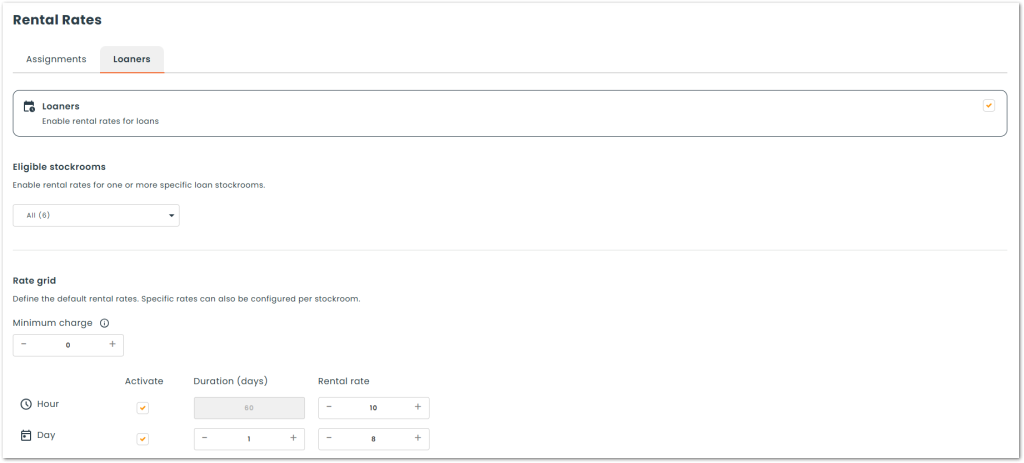
🔍 To access this feature : Settings › Rental rates
Maintenance plans
Our maintenance module gets a makeover to offer unparalleled flexibility to your asset management! Anticipate breakdowns, standardize your checks, and leave nothing to chance.
Multi-maintenance
Configure different types of maintenance with their own frequencies for the same entity.
Custom checklists
Create custom checklists that are displayed directly on each maintenance form.
Automatic generation of work orders
Save time and avoid oversights. As soon as a maintenance is triggered, Hector can automatically create a work order and associate it with the right resource.
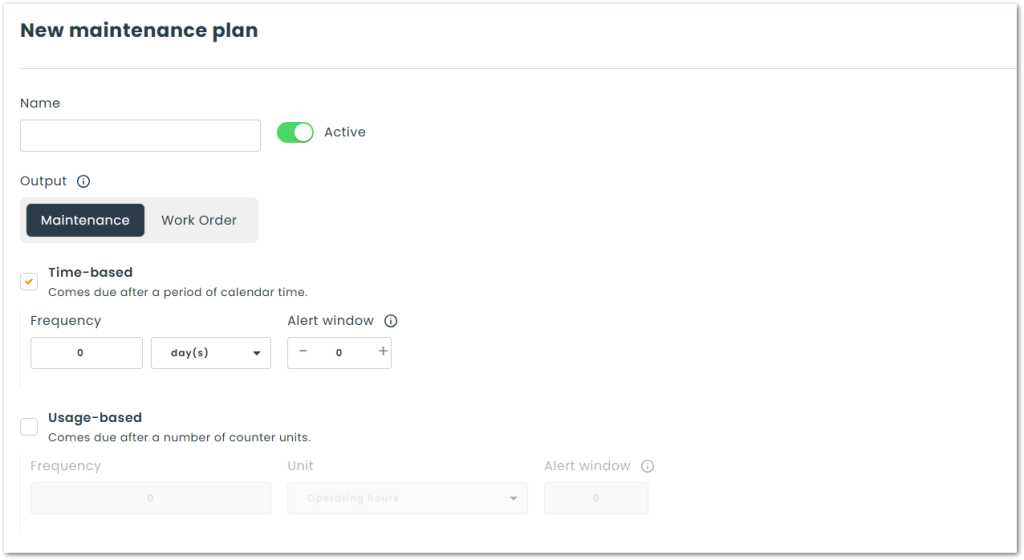
🔍 To access this feature : Settings › Maintenance plans
📙 Maintenance plans user guide
Work orders 2.0
Our work order module has been completely redesigned to adapt perfectly to your operational reality! With this redesign, it’s Hector that adapts to you and not the other way around.
100% custom forms
You now have total control. Define the display, location, and mandatory nature of the fields, and organize your information by creating your own sections.
A controlled process from A to Z
Create distinct forms for each step (creation, processing and closing of the work order). Better yet: enforce specific forms based on your users’ roles and permissions to ensure strict compliance with your internal processes.
Lightning-fast entry
The line addition tool (assets, hours, locations, free tasks) gets a new look. Its interface is now simpler, more visual, and much faster to maximize your teams’ efficiency.
New “Production” mode
A true revolution for your assembly line! Upon closing a work order, the raw materials or components used can now automatically create and add a new asset (or finished product) into your inventory.
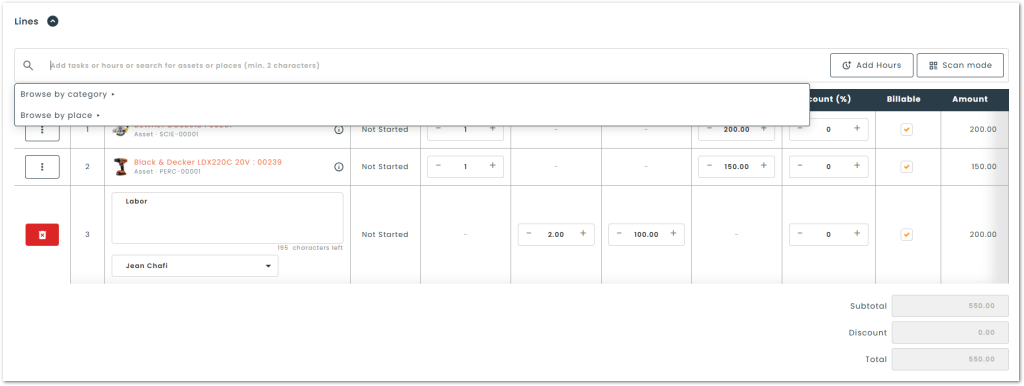
📙 Work orders forms configuration guide
💻 Global
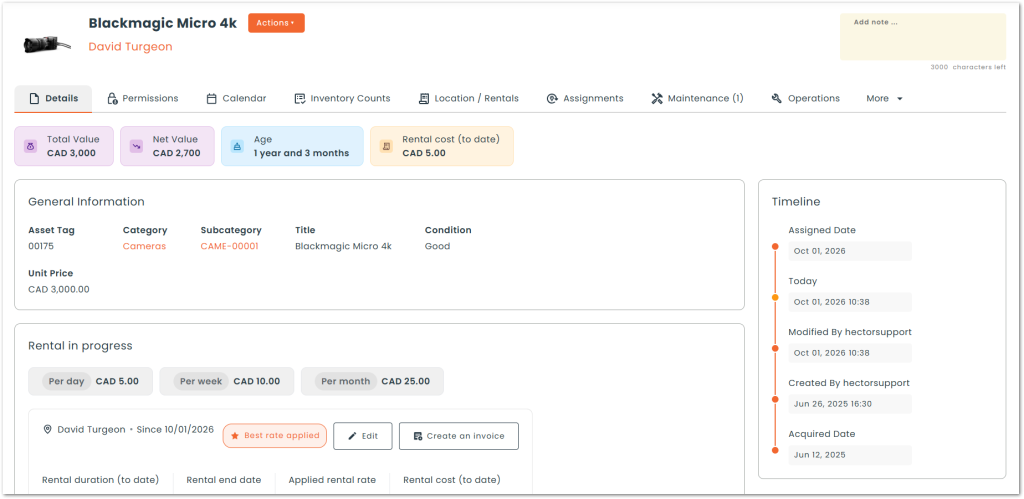
● Redesign of the entity record
The entity record benefits from a complete visual redesign to offer a more modern and better-structured interface. This new visual directly highlights essential information, including financial value, expense history (maintenance and work orders), utilization rate, and the current rental cost.
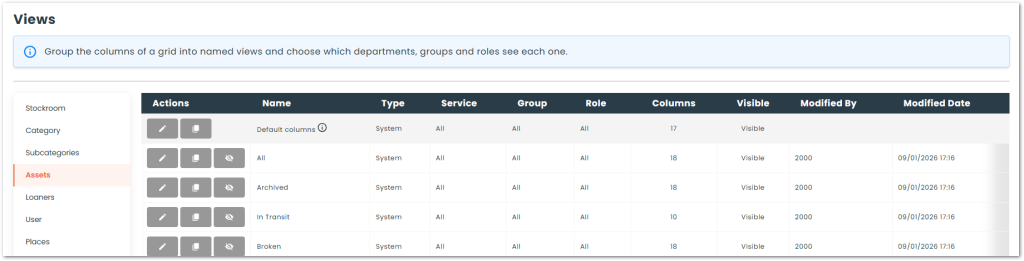
● Customizable tabs and centralized view management
Ability to create and configure new tabs (views) for all software grids. To facilitate their administration, a new “Views” tab has been added to the settings. This space centralizes all the software’s views and allows you to easily manage them, whether to create, edit, duplicate, or hide them.
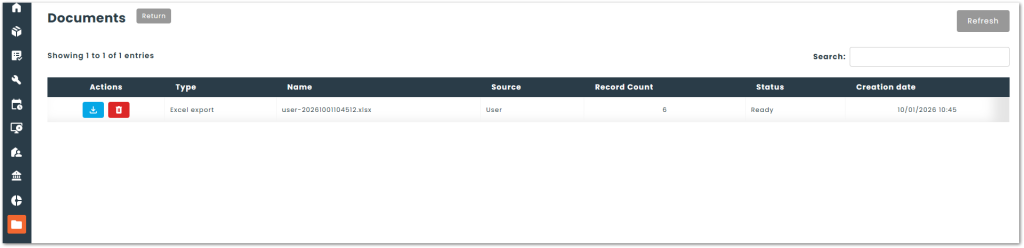
● New “Documents” section
A new “Documents” section is now accessible in the vertical menu. This space centralizes all your data export requests, allowing you to easily find and download all generated files in one place.
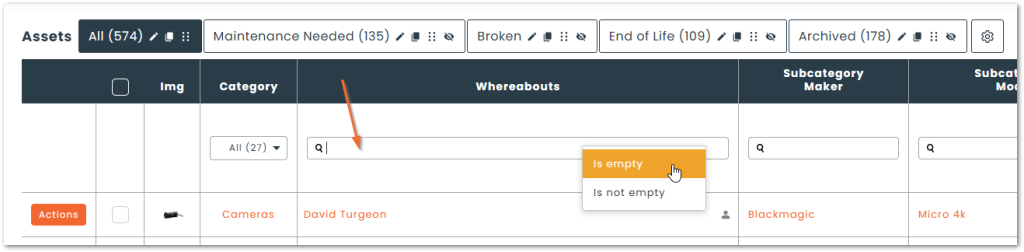
● Filter on empty / non-empty cells
Option to sort the columns of your grids based on the presence or absence of data. By right-clicking on a column’s search field, you can choose to quickly filter cells to display only empty or non-empty items.
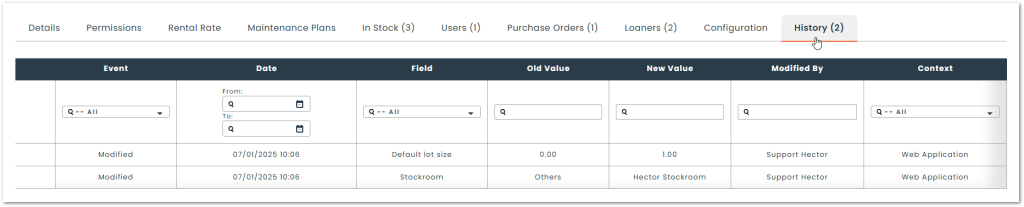
● History 2.0
A new history log appears to progressively replace the current system. More comprehensive and better structured, this history simplifies data consultation thanks in particular to dedicated columns for the modified field, the comparison between the old and new value, as well as the exact context of the action’s execution (web, mobile, count, or integration). It is accessible both on each record’s file and from a tab on the entity grids to analyze the global history.
ℹ️ Note that this history log is not yet available for assets and users.
⚙️ Settings
Global
● Management of vertical menu items
Ability to select the modules and items visible in the sidebar menu. Changes made to the menu structure apply to all platform users.
ℹ️ For added precision, you can customize the vertical menu display for each user role.
🔍 To access this feature : Settings › General › Menu
● Targeting search fields by entity
Ability to precisely select the fields taken into account during a search linked to an entity. This option helps avoid unnecessary results by restricting the search to specific values (for example, searching only in a subcategory’s description without including the brand and model).
ℹ️ Available for the following entities :
- Inventory (stockrooms, categories, subcategories and assets)
- Resources (users, locations, customers, vendors and contacts)
- Operations (requisition orders, purchase orders, transfer orders and work orders)
- Accounting (invoices and payments)
- Inventory counts
- Loans
- Software
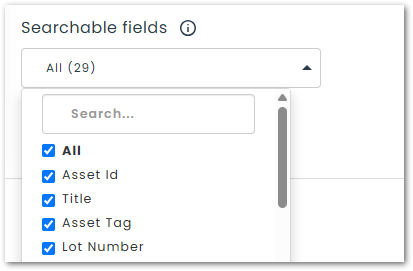
🔍︎ To access this configuration : Settings › Entity of your choice › Search
Custom notifications
● Addition of new entities
The complete creation of notifications now extends to the following entities :
- Maintenance
- Requisition orders
- Purchase orders
- Work orders
- Invoices
- Payments
- Software
- Software (versions)
- Software (licenses)
The limited* creation of notifications is now available for the following entities :
- Locations
- Spaces
- Customers
- Vendors
- Contacts
ℹ️ Limited creation : For now, these notifications can only be linked to the Email sent trigger.
🔍︎ To access this feature : Settings › Automation
📙 Custom notifications user guide
Custom emails
● Addition of new entities
Email customization now extends to the following entities :
- Maintenance
- Users
- Locations
- Spaces
- Customers
- Vendors
- Contacts
- Software
- Software (versions)
- Software (licenses)
🔍︎ To access this feature : Settings › Templates › Email
Custom printouts
● Addition of new entities
Printout customization now extends to the following entities :
- Maintenance
- Users
- Locations
- Spaces
- Customers
- Vendors
- Contacts
- Software
- Software (versions)
- Software (licenses)
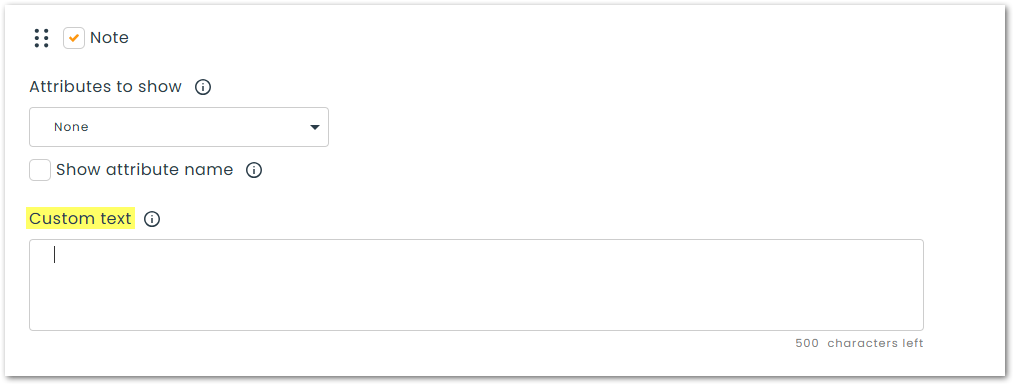
● Custom text on labels
Ability to insert static and permanent information directly on your labels, such as your organization’s name or a contact phone number.
📙 Barcode/QR labels user guide
Subcategories
● Redesign of consumption automations
The configuration page for automatic consumption rules (during asset movement via assignment or transfer order) has been reworked to simplify its management :
Column filters
Added filters to each column of the grid to refine and speed up searches.
Multiple selection
Ability to configure simultaneous automations on multiple subcategories in a single operation.
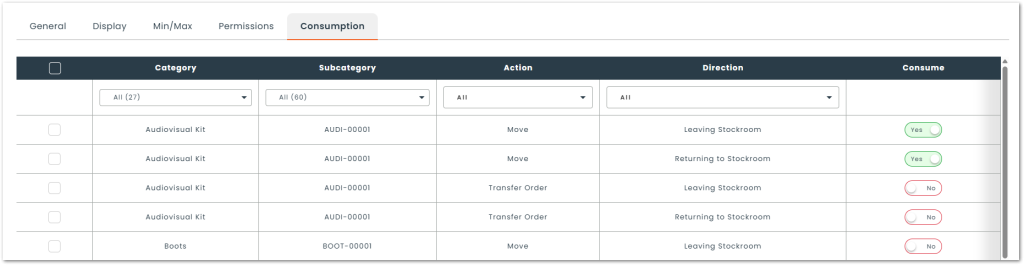
🔍︎ To access this feature : Settings › Subcategories › Consumption
📙 Consumption automations user guide
Data import
● Management of category permissions via inventory import
The inventory import template now integrates the category permissions below, saving you from having to configure these accesses manually afterward :
- Viewing
- Reservation
- Requisition
🔗 Integrations
Gaia ✨
● Automatic category sorting
When you import subcategories with integrations, Gaia identifies the model type and classifies it in the right category, allowing you to keep your inventory well organized without having to worry about it.
● Search by descriptive subcategory name
Replace Lenovo references, often difficult to understand, with more evocative names. Gaia identifies the exact model of the device and replaces the technical reference with the common name you know, such as “ThinkPad X1 Carbon”.
🔍︎ To access your Gaia space : Settings › Gaia
New integrations
● Lansweeper | 🔓 Available by invitation
Connect Lansweeper Cloud to Hector: workstations, servers, mobiles, and network equipment detected are imported and updated every day.
● Fortinet | 🔓 Available by invitation
Centralize your FortiManager network inventory: firewalls, switches, and access points synchronized daily, without manual entry.
● GS1
Integration allowing the reading of supplier GS1 barcodes (GS1-128, GS1 DataMatrix) to automatically fill in fields when creating an asset: subcategory by supplier SKU, end-of-life date, batch number, and configured attributes.
📦 Inventory
Subcategories
● Units of measurement
A new module dedicated to units of measure is now available. It allows you to create and customize your own units, then associate them directly with your subcategories to ensure more accurate, consistent data entry tailored to the nature of your goods.
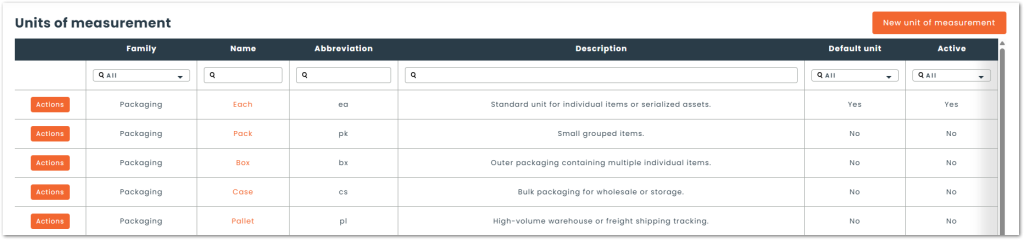
🔍︎ To find this configuration : Settings › Units of measure
● Merging subcategories
Ability to combine multiple subcategories into one with automatic migration of all associated assets and data to the retained subcategory.
ℹ️ Available via multi-select from the subcategory grid.
● Multiple deletion of subcategories
Ability to select and delete multiple subcategories in a single batch action to speed up your database cleanup.
ℹ️ Available via multi-select from the subcategory grid.
Assets
● Optimization of lot price calculation
The lot valuation mode now integrates the Weighted Average Cost method. By dividing the total value of the lots by the overall quantity of units, this feature helps smooth out price variations over time.
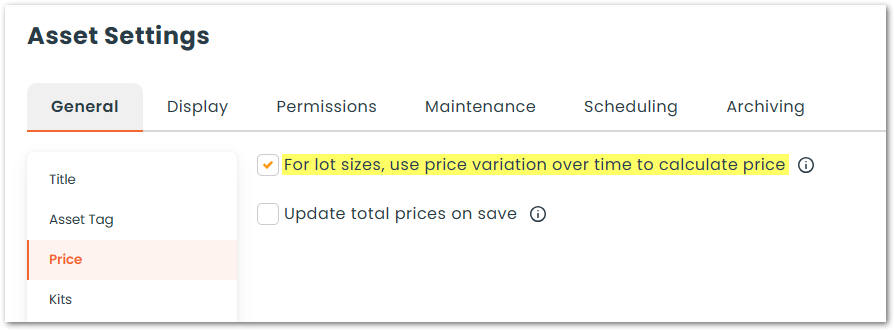
🔍︎ To activate this configuration : Settings › Assets › Pricing
● Reset and customization of asset numbering
Ability to reset your asset numbering sequence or specify a custom starting number. These new options allow you to easily adapt the platform to your internal conventions or continue numbering already in place without breaking history.
🔍︎ To find this configuration : Settings › Assets › Asset number
🔧 Operations
Transfer orders
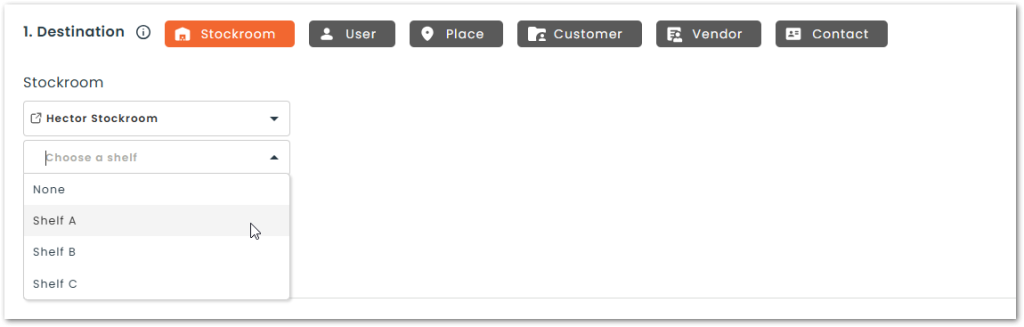
● Addition of shelves as a transfer destination
Ability to select a shelf* as a destination when creating a transfer order. This new feature allows you to indicate the destination location of your assets more accurately during your inventory movements.
ℹ️ The term “Shelf” may vary depending on your platform’s settings. It designates a sub-location within a stockroom.
📅 Loans and reservations
Global
● Relocation of the Planning and Calendar views
To streamline your navigation, the Planning and Calendar views have been moved from the loan grid header to the main page header. This change allows you to switch views faster and access your tools more easily.
Configurations
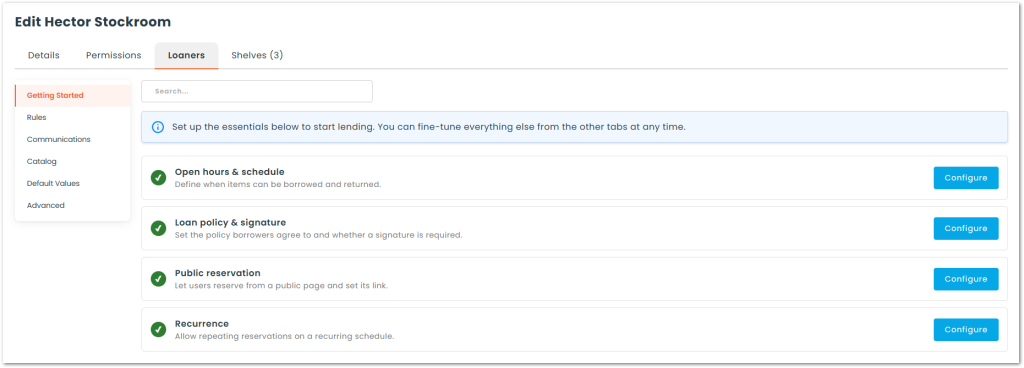
● Redesign of a stockroom’s loan configuration page
The loan settings interface has been redesigned to simplify onboarding and make option management easier :
“Getting Started” section
Added a dedicated space to guide first steps and assist with initial setup.
Clarified organization
Complete recategorization of all settings for more logical navigation.
Search bar
Integration of a search field allowing you to instantly find any configuration.
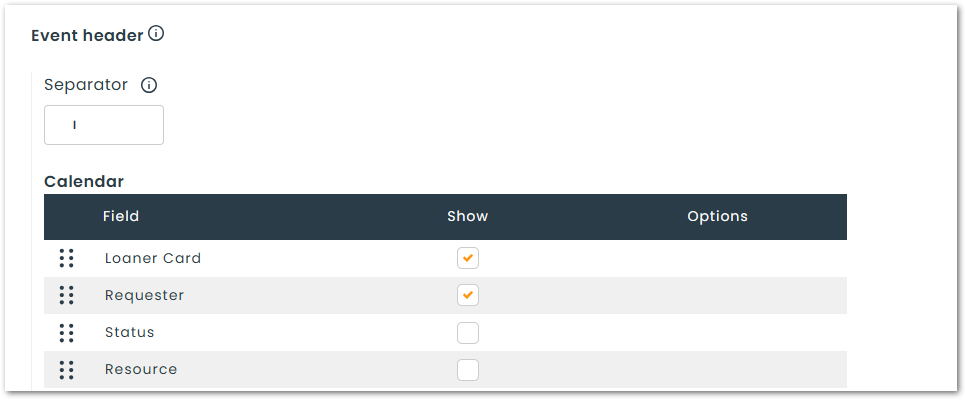
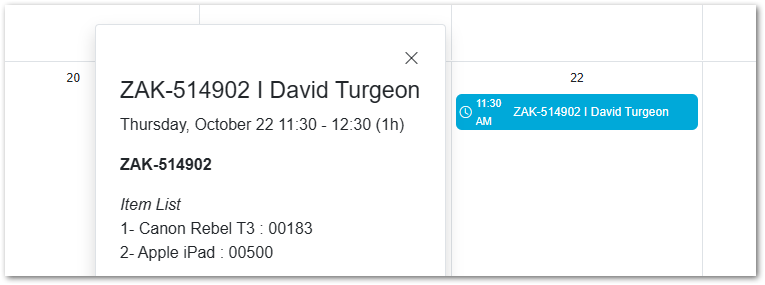
● Customization of headers in the Planning and Calendar views
Ability to choose and reorder the fields displayed in the event header (Planning and Calendar views) for quick access to your loans’ key information.
🔍︎ To find this configuration : Stockroom Loan Settings › Default values
Loan management
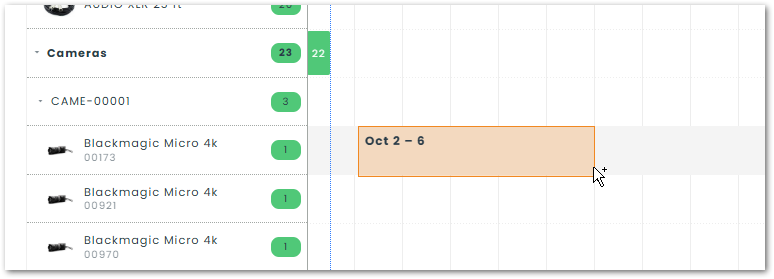
● Creation of loans from the planning view
Ability to initiate a reservation directly from the planning view. Thanks to a smooth drag and drop interface, you simply select the desired time slot right on the calendar to easily and quickly create a new loan.
ℹ️ Please note that this option is only available for hour and day modes.
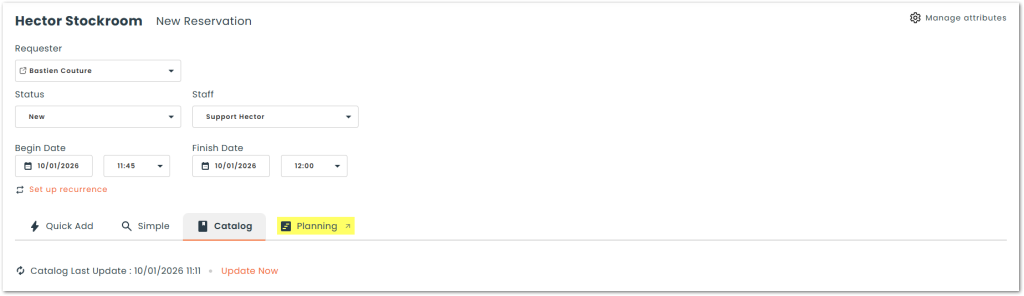
● Planning view on the loan creation page
The Planning view is now accessible directly from the loan creation page. This new feature allows you to check asset availability at a glance for the desired period and easily add them to your cart.
💿 Software
Global
● Integration of the Software module into the API
Full support for the Software module in the API to automate your license management and synchronize your data with your external tools.
Software
● Adding an image for software
Ability to associate an image to a software record for easier and faster visual identification in the application.
● Software discovery grid (Pheidix)
A new discovery grid now allows you to list and centralize all software detected by the Pheidix agent. When processing detected items, you can specify whether the creation should generate individual versions by version number or a single version for all installations.
Versions
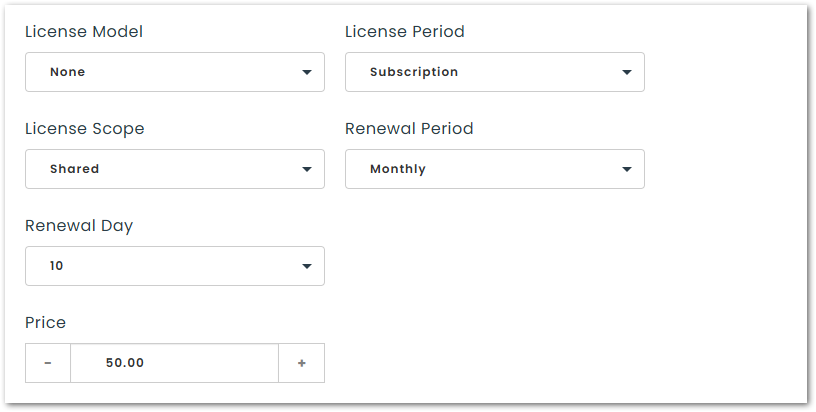
● Addition of renewal and pricing fields
Addition of renewal parameters (period, month, and day) and a pricing field (price) for more precise contractual and financial tracking.
● Merging versions
Ability to merge multiple versions into one with automatic transfer of purchased licenses and assigned licenses.
ℹ️ Available via multi-select from the software versions grid.
Licenses
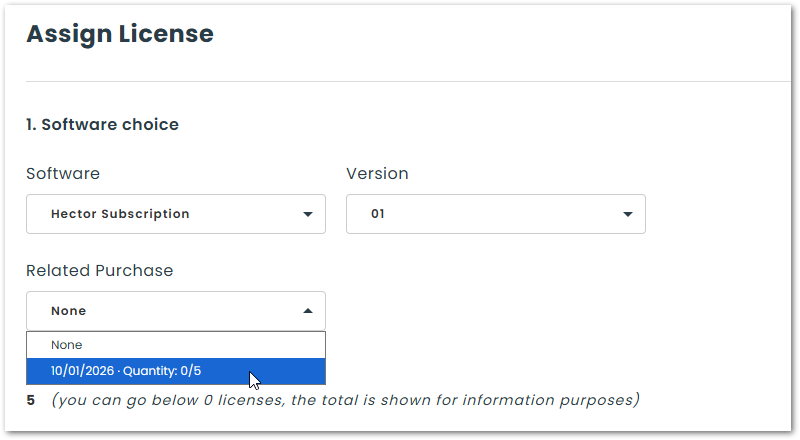
● Association of a purchase to a license
Ability to link a purchase directly to a software license for better financial and documentary tracking.
📄 Reports
Inventory
● New report : Inventory Addition
An “Inventory Addition” report has been added to the reports section. It allows you to consult and export the complete history of assets integrated into your fleet, thus simplifying the tracking of new acquisitions and stock entries.
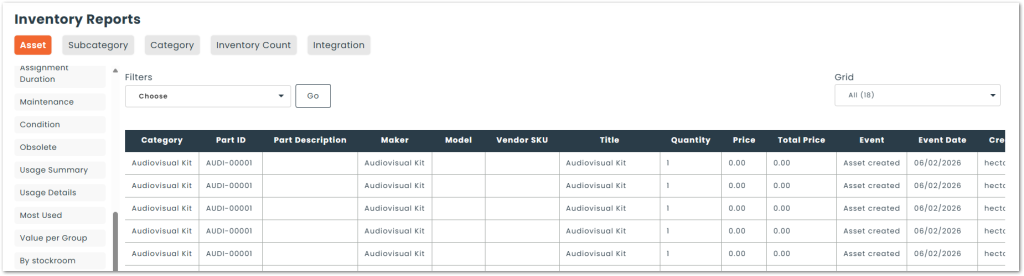
🔍︎ To find this report : Reports › Inventory
💡 The report subscription feature allows you to automate the sending of all your reports in just a few clicks.
📱 Mobile app
Global
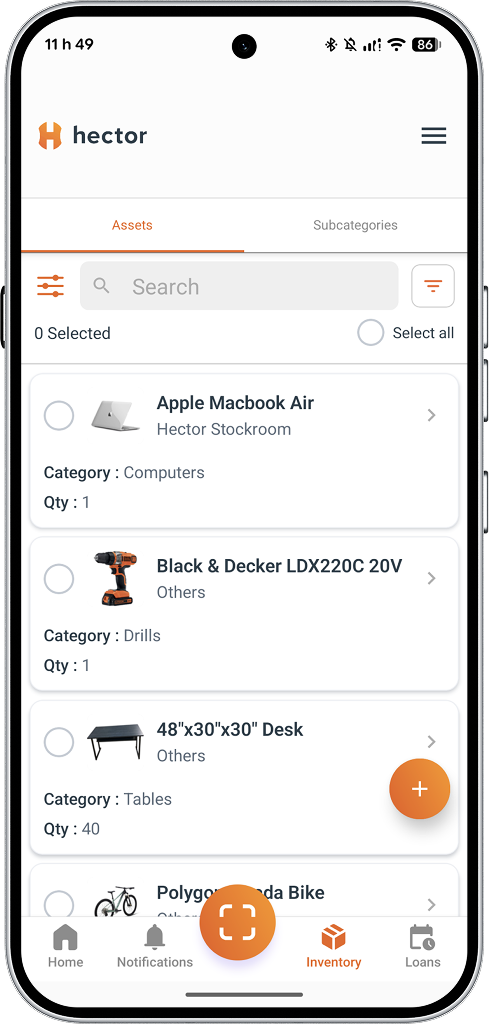
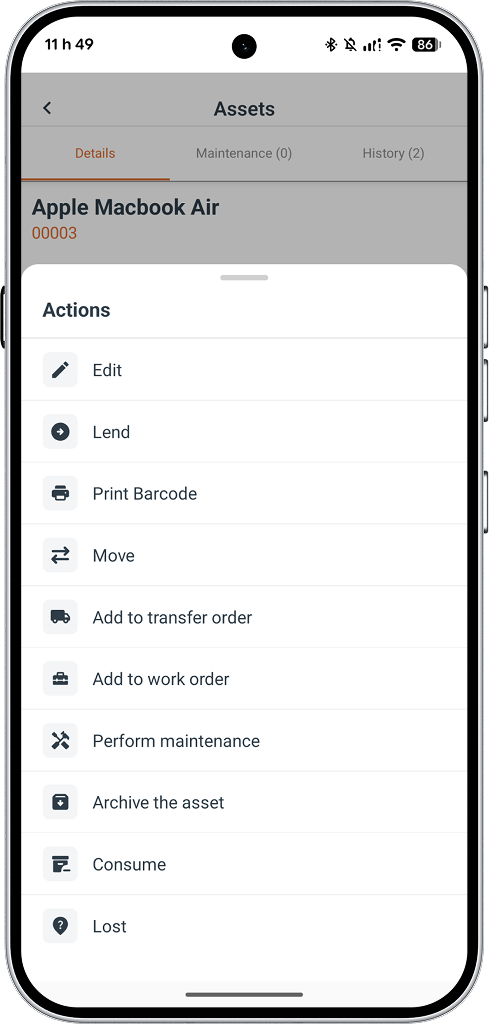
● Modernization of lists and the action menu
The presentation of lists and the action menu has been modernized to offer clearer and smoother consultation :
Lists
New redesigned display to offer a clearer and more spaced-out presentation of your assets, subcategories, loans, inventory counts, operations, and notifications.
Action menu
Each action is now accompanied by an explanatory visual cue (icon) to offer smoother and more intuitive navigation.
● New scanning module
Integration of a new, more efficient scanning engine to speed up the reading of your codes and make scanning smoother.
Inventory counts
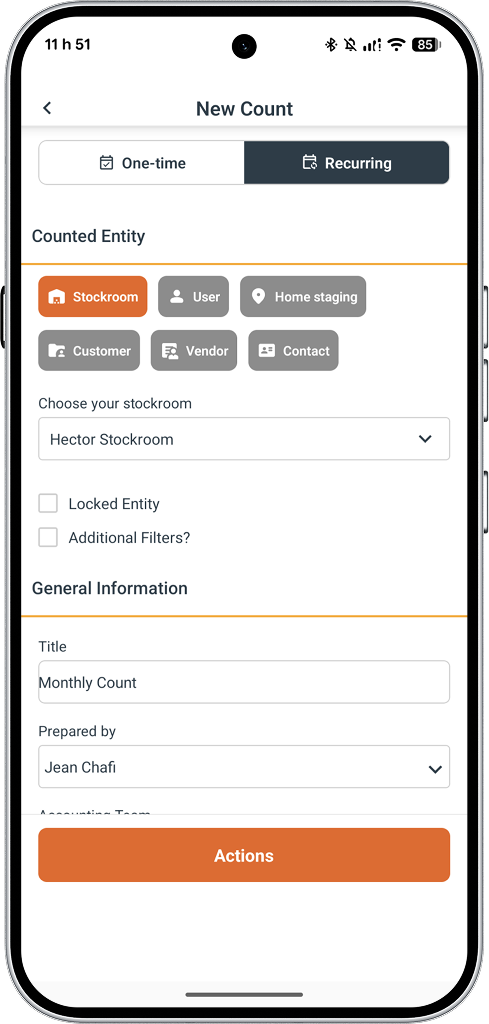
● Creation of counts on mobile
Already accessible on the web version, the creation of inventory counts is now available directly from the mobile app. This standardization offers you more autonomy in the field, allowing your teams to initiate and perform stock audits wherever they are.
Iris
● Addition of the loan creation action
The Iris module now supports the loan creation action. Already accessible on the web, this feature is now available on the mobile application: simply scan an Iris code to instantly create a new loan in the software.
We can’t wait to see you use these new features !
If you would like to explore how they can address your specific challenges, our team is here for you. Email us at [email protected] for personalized support. It will be our pleasure to guide you in maximizing the potential of our solution.